













-
 Original High-Quality Product
 -
One all-inclusive price. No hidden fees
-
Immediate download
-
Free updates for new versions
-
Unlimited Activations
-
24/7 free premium Support
-
7-day money-back guarantee


Partial Closure EA MT4 — Automated Partial Close for Any Strategy
Partial Closure EA is a trade management utility for MT4 that automatically closes a set portion of open positions at defined profit targets. It works alongside any existing manual or automated strategy — not as a standalone signal generator. Developer Eleni Anna Branou published version 1.10 on June 6, 2022, with a free demo available.
- Vendor website: Click here
Key Highlights
- ✅ Closes partial lots automatically at your target — preserves running profit while leaving remainder open
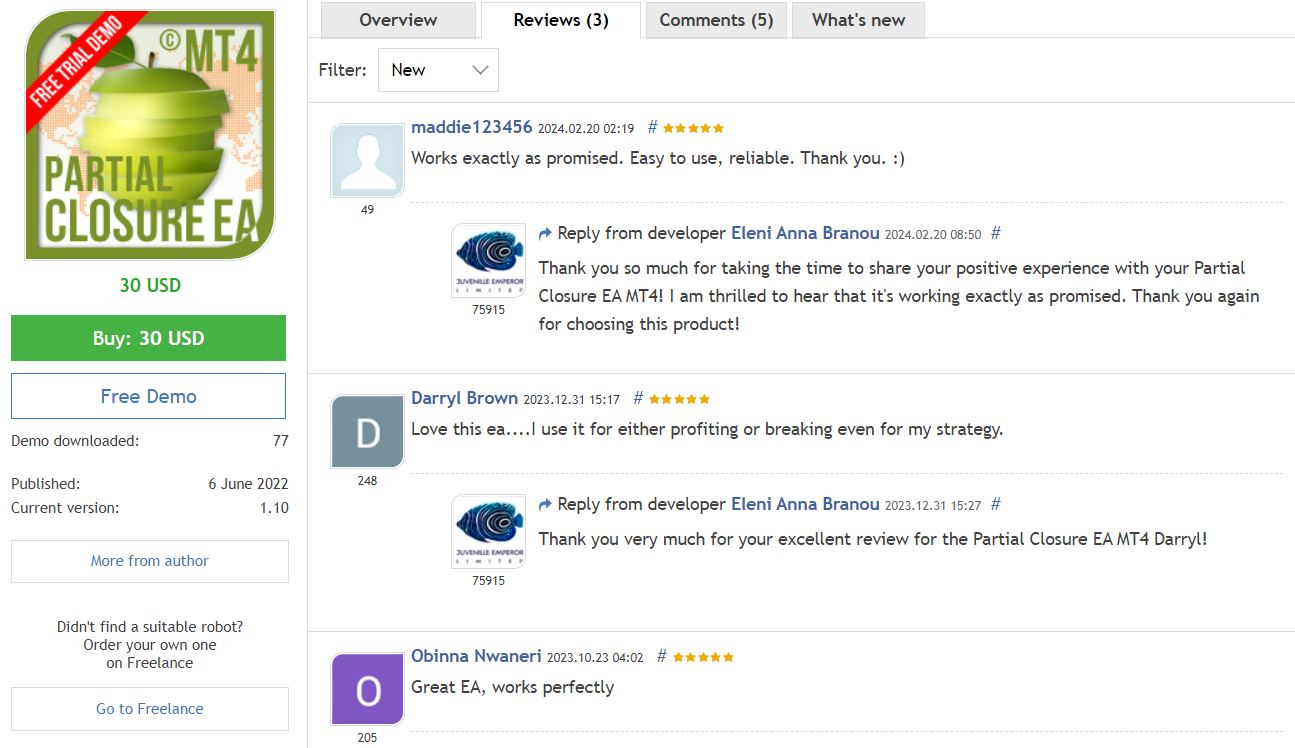
- ✅ 3 verified 5-star ratings on MQL5 marketplace; 248 traders found top review helpful
- ✅ Works on any MT4 pair and timeframe — plugs into your existing strategy without replacing it
- ✅ Configurable partial-close percentage and trigger level — no fixed hard-coded values
- ✅ Free demo download available before purchase — test full functionality on your setup first
- ✅ 77 demo downloads confirm active community validation since June 2022
Performance & Proof
This EA is a trade management tool, not a signal-generating strategy. No live Myfxbook account or backtest report applies — performance depends entirely on the base strategy it accompanies. User validation is the relevant proof here.
All three MQL5 marketplace reviews rate it 5 stars. Darryl Brown’s review — found helpful by 248 traders — confirms real-world use for both profit-locking and break-even management. Obinna Nwaneri’s review was found helpful by 205 traders, and maddie123456’s by 49.
The EA carries no autonomous trading risk — it places no independent orders. Risk exposure comes entirely from your base strategy. Configure the partial-close trigger conservatively on a demo account first. Run at least 60 days of demo testing alongside your strategy before applying to a live account. Outcome depends on your strategy’s own edge, not this tool.
User reviews reflect individual experience. No verified performance data exists independent of the base strategy used.
How It Works
Strategy: Trade management overlay — monitors open MT4 positions and executes partial closes at user-defined profit levels.
Entry: No independent entries — attaches to existing open trades placed by you or another EA.
Exit: Closes a configurable percentage of position size when price hits the defined profit target; remainder stays open.
Risk Control: Partial-close percentage and trigger level set by user — no martingale, no grid, no compounding exposure.
✅ Best conditions: Trending pairs with momentum • Strategies that regularly overshoot initial targets • Accounts where reducing emotional exit decisions is a priority
⚠️ Caution: Choppy, range-bound markets where early partial closes reduce net profit • Strategies with very tight initial targets where partial close is impractical
Technical Specifications
| Specification | Requirement |
|---|---|
| Platform | MetaTrader 4 (MT4) — version 1.10 |
| Currency Pair | All MT4 pairs supported |
| Timeframe | All timeframes — attaches to existing open trades |
| Minimum Deposit | Determined by base strategy, not this tool |
| Broker Type | Any MT4-compatible broker |
| VPS | Recommended for uninterrupted position monitoring |
| License | Free demo available; full license $30 USD |
This EA is MT4 only. Need an MT5 trade management solution? Browse MT5 EAs.
Who Should Use This EA
✅ Ideal for:
- Manual traders who want to automate partial profit-taking without changing their full strategy
- EA users whose existing robot has no built-in partial-close functionality
- Traders using news or momentum strategies where locking partial profit mid-move matters
- Anyone managing multiple open positions who wants consistent, emotion-free partial exits
✅ Best results when:
- Running on a VPS with continuous MT4 uptime to catch profit targets in real time
- Combined with a strategy that regularly achieves 20+ pip moves — enough room for partial close to add value
Download Package Included
- ✅ Experts:
- Partial Closure EA MT4 v1.1_fix.ex4
- ✅ Presets
- ✅ Installation and setup guide
Product download link sent immediately via email after purchase.
Frequently Asked Questions
Does the Partial Closure EA have verified trading results?
How does the Partial Closure EA work with my existing strategy?
Can I use this EA with another Expert Advisor running on the same chart?
Is there a free demo version I can test before buying?
What account size do I need to use this EA?
What are the risks of using this EA and how do I manage them?
What broker and account type work best with the Partial Closure EA?
What support do I get after purchase?

You might also like:

Golden Owl EA v9 MT4 with SetFiles | High Profit for Gold
In stock

HFT Pro Evolution EA MT4 with SetFiles | Premium Original
In stock

Z4scalp EA v2.2 MT4 with Setfiles | Working Version
In stock

Black Wolf EA MT4 & MT5 (original ultra profit)
In stock

Apex EA v2.0 MT4 with Setfiles
In stock

Javier Trading Scalper Gold EA MT4 & MT5 with Setfiles (Original working version)
In stock
Reviews
Clear filtersThere are no reviews yet.