












-
 Original High-Quality Product
 -
One all-inclusive price. No hidden fees
-
Immediate download
-
Free updates for new versions
-
Unlimited Activations
-
24/7 free premium Support
-
7-day money-back guarantee


Oracle EA – Automated XAUUSD and GBPUSD Trading Robot for MT4/MT5
Oracle EA is an automated trading robot for XAUUSD and GBPUSD on the M5 timeframe, available as an MT5 listing on the MQL5 marketplace and as a separate MT4 variant. Historical Myfxbook records from a real Fusion Markets account provide the primary available proof. Public live verification for the current Oracle MT5 listing is not included on this page at this time.
Key Highlights
- ✅ Trades XAUUSD and GBPUSD on M5 — MT4 variant also documents EURUSD
- ✅ Two separate versions: Oracle MT5 (MQL5 marketplace) and MT4 FTMO variant — confirm which version you are purchasing
- ✅ Optional news filter and configurable trailing stop included
- ✅ Compatible with low-spread ECN/STP brokers; VPS recommended for stable M5 execution
- ✅ Default risk is 30% per trade — official setup notes recommend reducing to 1%–10% before live use
Performance Results
The primary proof available for Oracle EA is the @Daxter2533-OracleEaMixed Myfxbook record — a real USD account on Fusion Markets using MetaTrader 4 at 1:500 leverage. It recorded +565.93% gain, a 59.68% peak drawdown, and a profit factor of 1.53 across 1,518 trades between September 2022 and February 2023. Part of the data is private, and the account has not been updated since February 1, 2023.
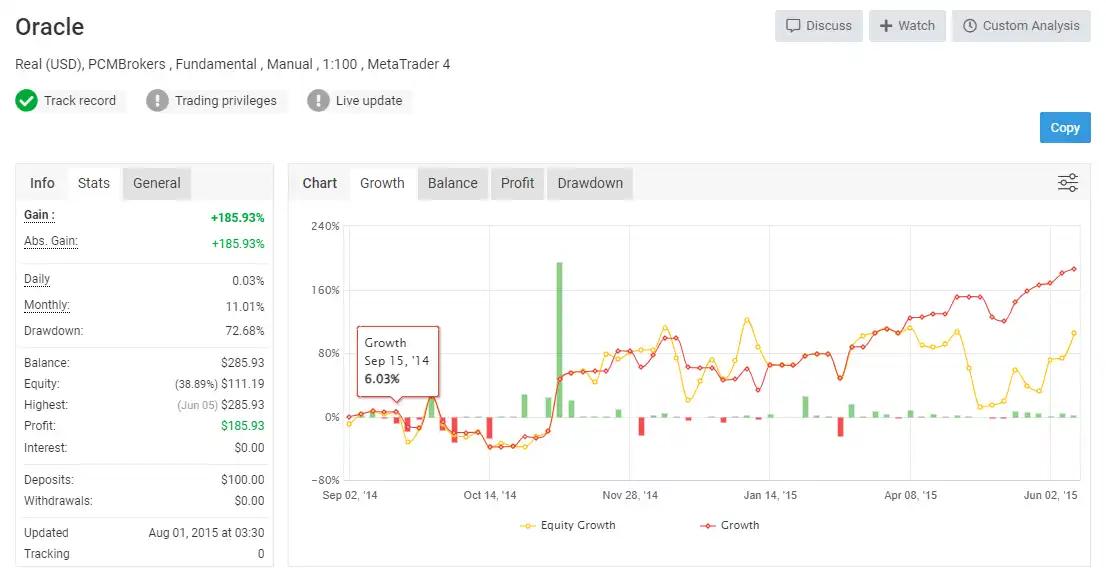
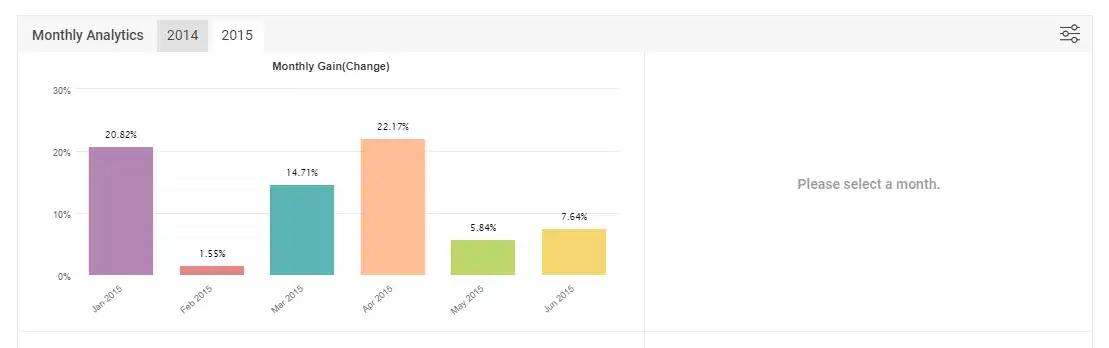
A second linked Myfxbook account covers September 2014 to June 2015, showing +185.93% gain and 72.68% drawdown on a $100 account at PCMBrokers. Both records are historical and should be treated as supporting reference only, not current verified performance for the Oracle MT5 listing.
The proof shown here should be treated as historical screenshot and account evidence, not public live verification. We recommend demo validation of at least 90 days before live deployment.
The 59.68%–72.68% drawdown range across both records is a critical data point. Drawdown at this level means the account lost more than half its peak equity at various points. Before using live capital: set risk per trade to 1%–5% rather than the 30% default, use a broker with tight spreads on XAUUSD, size your starting capital to absorb a 50%+ equity swing without a margin call, and monitor the EA actively during the first 30 days. These controls reduce the probability of account destruction before the strategy recovers, but do not eliminate drawdown risk.
How It Works
Strategy: Trades XAUUSD and GBPUSD on M5. The MQL5 Oracle MT5 listing describes a signal approach using RSI, Bollinger Bands, and machine-learning-assisted logic to identify entry conditions. The MT4 FTMO variant uses a different model that includes grid recovery behavior — confirm your version before live use.
Entry: Entry conditions are driven by indicator confluence and proprietary algorithmic logic per the MQL5 product description. Specific trigger thresholds are not detailed in the available setup materials; validate entry behavior in demo before going live.
Exit: Hard stop loss and take profit are documented. Optional trailing stop is configurable via Trailing Start, Trailing From, and Trailing Step inputs. Exit behavior under volatile conditions should be observed during demo testing.
Risk Control: Position sizing uses Percent of Risk from Deposit. The default 30% per trade is documented as high risk in the official setup notes. Use 1%–10% for practical account preservation. An optional news filter reduces exposure around scheduled events.
✅ Best conditions: Low-spread ECN broker on XAUUSD and GBPUSD • Risk set to 1%–10% per trade • Stable VPS connection for M5 execution
⚠️ Caution: Default 30% risk setting — reduce before any live use • Grid/martingale behavior varies by version — test in demo and confirm your version’s strategy model before deployment
Technical Specifications
| Specification | Detail |
|---|---|
| Platform | MT5 (MQL5 marketplace, by Stanislav Tomilov); MT4 variant also available (Oracle EA.ex4) |
| Currency Pairs | XAUUSD, GBPUSD (Oracle MT5); EURUSD also listed in MT4 FTMO variant materials |
| Timeframe | M5 (documented as required for both versions) |
| Minimum Deposit | $100 (per MQL5 setup notes; a larger buffer is strongly recommended given historical drawdown levels) |
| Recommended Deposit | Not specified for Oracle MT5; MT4 FTMO reseller materials suggest $1,000–$5,000 for the grid variant |
| Leverage | 1:200 minimum referenced in MT4 reseller materials; not confirmed for Oracle MT5 listing |
| Broker Type | Low-spread ECN/STP recommended; tight spreads on XAUUSD important on M5 |
| VPS | Recommended for stable M5 execution |
| News Filter / GMT Offset | News filter available via ec.forexprostools.com web request (MT4 setup); configure timing offsets before live use |
Who Should Use This EA
✅ Ideal for:
- Traders who have run M5 XAUUSD or GBPUSD EAs before and understand short-timeframe execution sensitivity
- Buyers comfortable with active drawdown monitoring and who plan a full 90-day demo period before committing live capital
- Traders evaluating the MT5 Oracle listing specifically, and who can clearly separate it from the MT4 FTMO grid variant
✅ Best results when:
- Risk per trade is kept between 1% and 10%, not at the 30% default
- Running on a low-spread ECN broker with a stable VPS and verified execution quality on XAUUSD
- The correct version (MT4 or MT5) is confirmed and tested in demo before live deployment
This EA is not ideal for traders expecting current live-verified performance data or those unwilling to demo test — the available proof is historical and strategy behavior varies by version.
Download Package Included
- ✅ Experts:
- Oracle EA V2.0.ex4
- ✅ Presets:
- H1 GOLD (xauusd).set
- M1 ALL PAIRS.set
- FROM H1 – Major Pairs.set
- NON MAJOR PAIRS.set
- 5M ALL PAIRS.set
- HOW TO LOAD PRESETS.pdf
- CHECK THESE STEPS BEFORE RUNNING EA.pdf
- ORACLE EA.pdf
- How do I install an Expert Advisor on MT4.pdf
Product download link is sent immediately via email after purchase.
Do the Oracle EA results shown here reflect current live performance?
Does Oracle EA use grid or martingale?
Which pairs and timeframe does Oracle EA trade?
What is the difference between Oracle MT5 and Oracle EA 2.0 FTMO MT4?
How much capital do I need to run Oracle EA?
What are the main risks and how do I manage them?
What broker should I use with Oracle EA?
What support do I get after purchase?

You might also like:

Fast Gold Scalper EA MT4 | Maximum Profit – Unlimited
In stock

Golden Owl EA v9 MT4 with SetFiles | High Profit for Gold
In stock

AI NoX EA v1.1 MT4 with Setfiles | Premium Unlimited
In stock

Cryo Scalper Indicator & Manager EA MT4 | Working version
In stock

CyberVision EA v1.2 MT4 with SetFiles
In stock
FX Intraday Scalper EA v3.0 MT4 with Setfiles (unlimited version)
In stock
Reviews
Clear filtersThere are no reviews yet.