













-
 Original High-Quality Product
 -
One all-inclusive price. No hidden fees
-
Immediate download
-
Free updates for new versions
-
Unlimited Activations
-
24/7 free premium Support
-
7-day money-back guarantee


AW Recovery EA – Automated Loss Recovery System for MT4
AW Recovery EA is a dual-position recovery system for MetaTrader 4, designed to close losing trades by averaging positions across both buy and sell directions on USDCAD and EURUSD.
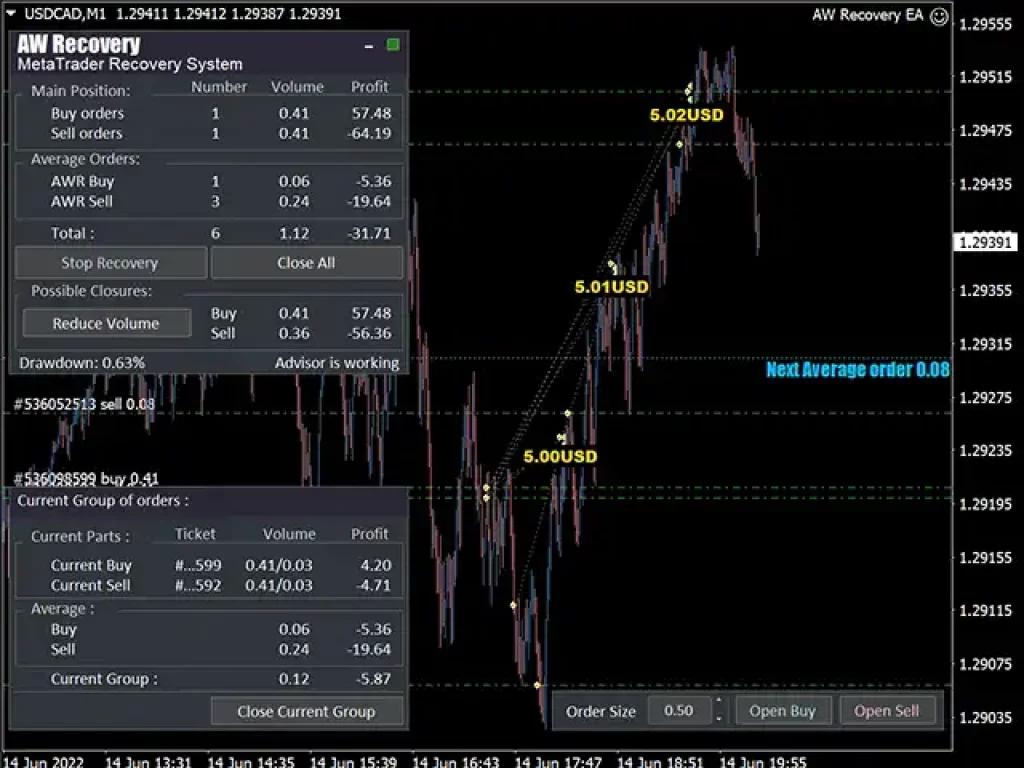
Live screenshots show the system actively managing 6 simultaneous orders at 0.63% drawdown during a recovery cycle — developer-provided, unverified by third-party signal service.
- Vendor website: Click Here
Key Highlights
- ✅ Recovers losing positions by building opposing average orders — not by adding to a single losing side
- ✅ Live screenshot shows 0.63% drawdown during an active 6-order recovery cycle on USDCAD M1
- ✅ Runs dual-direction logic: manages separate buy and sell position groups simultaneously
- ✅ Built-in volume reduction controls — Reduce Volume Buy/Sell buttons allow manual intervention at any point
- ✅ Unlike pure grid EAs, recovery exits are targeted per group — not tied to a single directional ladder
This EA is MT4 only. Need MT5 platform? Browse MT5 EAs
Performance Results
The developer provides live MT4 screenshots showing AW Recovery EA actively running on USDCAD M1. One snapshot records a 6-order recovery cycle — total volume 1.12 lots, drawdown 0.63%, with buy-side profit at $57.48 partially offsetting sell-side loss of -$64.19. The averaging layer (AWR) carries an additional -$25.00 across 4 sub-orders.
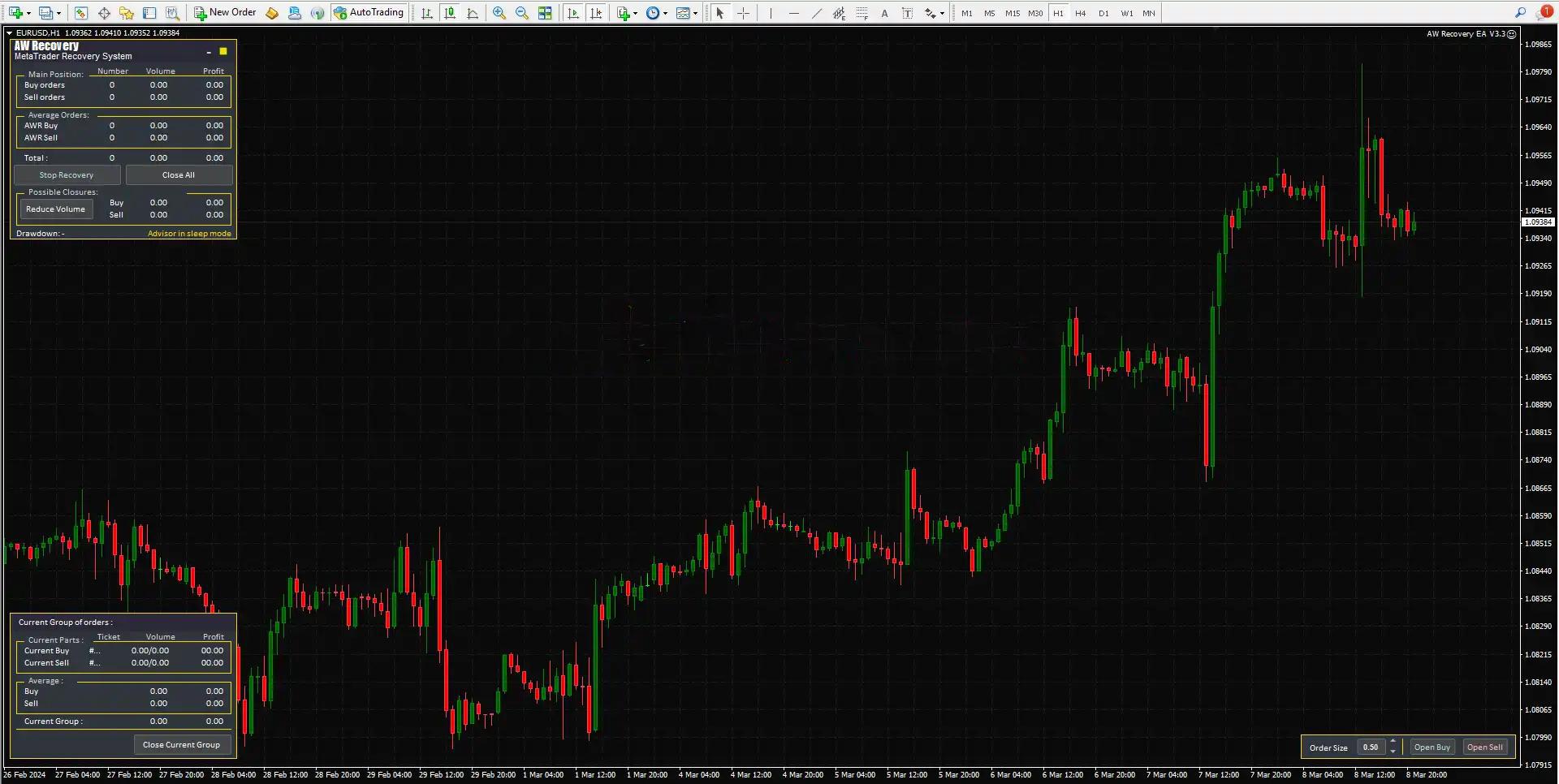
A second screenshot shows the system on EURUSD (Feb–Mar 2024 range) in sleep mode with zero open orders — confirming the EA idles cleanly between recovery cycles rather than holding permanent positions.
Risk disclosure: The averaging mechanic adds lot size across multiple sub-orders during a recovery cycle. In the documented snapshot, the AWR sell layer alone carried 4 orders and -$19.64 before the cycle resolved. Set strict capital limits — do not run this EA on accounts below the recommended minimum. Use the built-in Reduce Volume controls to cut exposure if drawdown exceeds your personal threshold. Realistic outcomes range from clean cycle closure in trending conditions to extended multi-order exposure in choppy, range-bound markets. Demo test minimum 90 days before risking capital.
Unverified developer claims. Results may be edited or cherry-picked. Demo test minimum 90 days before considering live capital.
How It Works
Strategy: Dual-direction recovery system on USDCAD and EURUSD M1 — exploits mean-reversion after a losing position opens
Entry: Opens buy and sell positions simultaneously; triggers recovery averaging when either side moves into loss
Exit: Closes positions when combined group profit reaches target; manual closure via Close All or Close Current Group buttons
Risk Control: Volume reduction buttons allow partial lot closure on either side; AWR sub-orders scale at defined lot increments (e.g. 0.06–0.08 lots per step)
✅ Best conditions: Trending price action • Defined intraday volatility on USDCAD/EURUSD • Low-spread ECN execution
⚠️ Caution: Extended sideways chop (increases AWR sub-order stack) • Wide spread brokers (raises average order cost)
Technical Specifications
| Specification | Requirement |
|---|---|
| Platform | MetaTrader 4 (MT4) |
| Currency Pairs | USDCAD, EURUSD (documented in screenshots) |
| Timeframe | M1 (required per live screenshot data) |
| Minimum Deposit | Not documented — contact vendor before deposit |
| Recommended Deposit | Not documented — demo test to establish safe level |
| Broker Type | ECN/STP preferred; tight spread essential for M1 execution |
| VPS | Required — M1 recovery logic needs 24/5 uptime; set correct GMT offset for your broker |
| Leverage | Not documented — multi-order stacking requires adequate margin buffer |
Who Should Use This EA
✅ Ideal for:
- Traders who already understand averaging mechanics and accept multi-order drawdown risk
- MT4 users actively trading USDCAD or EURUSD with an ECN broker on tight spreads
- Traders who want manual override capability — not a fully “set and forget” black box
- Recovery strategy testers willing to run 90+ days on demo before committing live capital
✅ Best results when:
- Running on a dedicated VPS with spread below 1.5 pips on USDCAD
- Capital is sized with enough margin buffer to sustain 6+ simultaneous open orders during deep cycles
Download Package Included
- ✅ Experts:
- AW Recovery EA (.ex4 )
- ✅ Presets:
- low risk settings.set
Product download link sent immediately via email after purchase.
Frequently Asked Questions
What results has AW Recovery EA actually achieved?
How is this different from a standard grid or martingale EA?
Can I use AW Recovery EA on a prop firm funded account?
Does the EA require manual intervention during trades?
How much capital do I need to run this EA safely?
What are the real risks and how do I manage them?
What broker and account type work best with this EA?
What support do I get after purchase?

You might also like:

Reactor Scalper EA v1.0 MT4 | Gold Trading – Unlimited
In stock

Fast Scalping EA MT4 with Setfiles (ultra low risk)
In stock

Regal Spear EA v1.1 MT4 with Setfiles
In stock

Black Wolf EA MT4 & MT5 (original ultra profit)
In stock

Apex EA v2.0 MT4 with Setfiles
In stock

Instant Funding AI EA MT4 with Setfiles (Original Version)
In stock
Reviews
Clear filtersThere are no reviews yet.