



















-
 Original High-Quality Product
 -
One all-inclusive price. No hidden fees
-
Immediate download
-
Free updates for new versions
-
Unlimited Activations
-
24/7 free premium Support
-
7-day money-back guarantee


Quantum Trade EA – GBPUSD H1 Session Breakout EA for MT4 and MT5
Quantum Trade EA is a GBPUSD H1 breakout EA for MT4 and MT5, developed by Bogdan Ion Puscasu and promoted through Incredible Traders. The EA uses a timed session price box to place pending orders around a defined range, targeting the directional breakout that follows the Asian/London overlap. The strongest available proof is a 23-week MQL5 demonstration signal on an IC Markets demo account — useful as a behavioral reference, not as verified live-account performance.
Key Highlights
- ✅ GBPUSD H1 session breakout using a timed price box, pending buy/sell stop orders, and trailing stop
- ✅ Available for MT4 (v4.95 confirmed) and MT5
- ✅ Max Open Orders set to 1 in default configuration
- ✅ Designed for low-spread ECN accounts (IC Markets or Pepperstone recommended) with GMT+2 winter / GMT+3 summer server time
- ✅ Recovery mode is enabled by default with a 3x multiplier — understand this behavior before setting live lot size
Performance Results
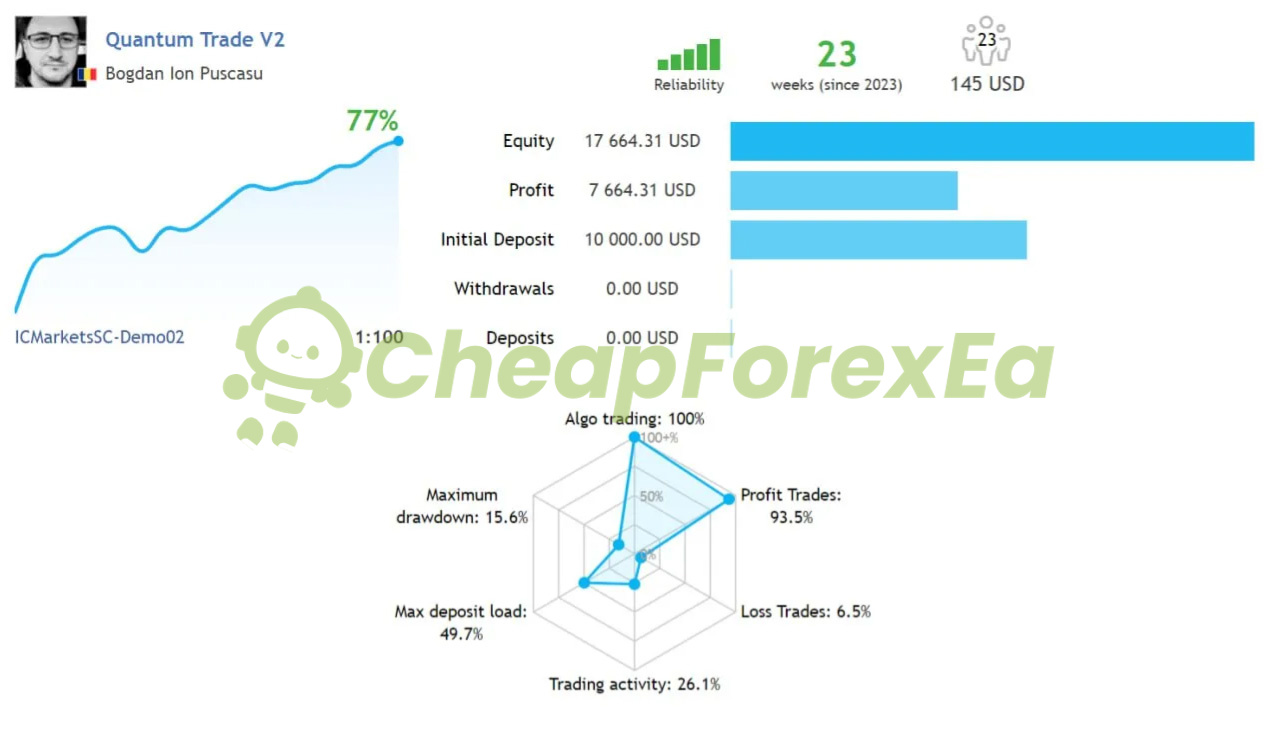
The primary public evidence consists of two MQL5 demonstration signal records. The stronger record — Quantum Trade V2 on an IC Markets demo account (ICMarketsSC-Demo02) — ran for 23 weeks on MT4 and recorded 77% equity growth, a 93.5% win rate, a 15.6% maximum drawdown, and a 49.7% peak deposit load across 142 trades, using a $10,000 starting balance at 1:100 leverage. A second MT5 demonstration signal recorded 59.3% growth over 8 weeks, a 3.98 profit factor, and a 7.52% relative drawdown across 37 trades. The 8-week record is too short to draw strong conclusions; the 23-week record is more useful for evaluating trade frequency, drawdown behavior, and win rate.
View the Quantum Trade V2 public MQL5 signal
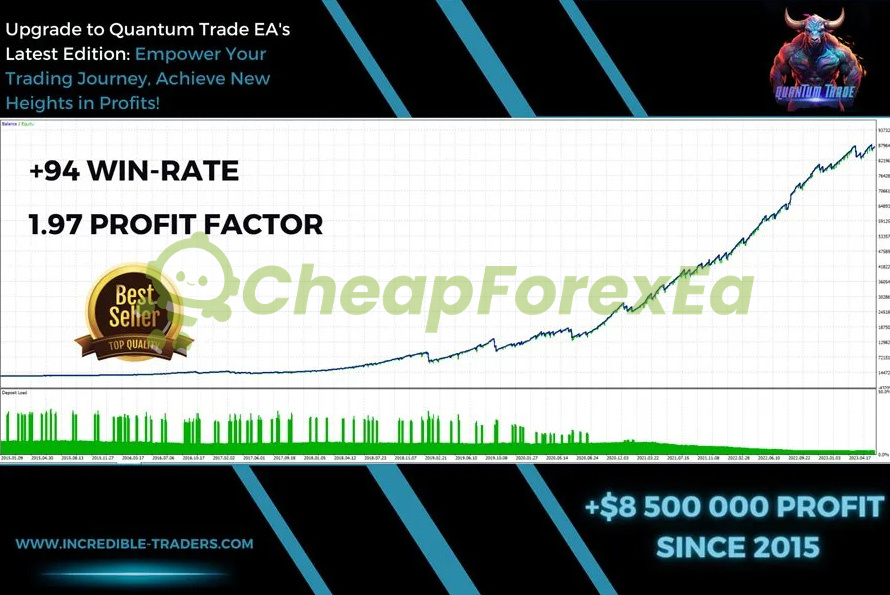
A promotional backtest summary references a 94% win rate and 1.97 profit factor since 2015. The full report — including drawdown, total trades, initial deposit, and date range — is not visible in the available materials. Treat this as promotional evidence only, not a verifiable strategy tester report.
Both MQL5 records are demonstration signals run on demo accounts. Demo conditions do not replicate live spread, slippage, or execution. Public live verification via Myfxbook or FXBlue is not included on this page at this time. The proof shown here should be treated as demonstration-signal and promotional evidence, not public live verification. We recommend demo validation before live use.
Recovery mode is enabled by default with a 3x multiplier across up to 3 recovery trades. This means a losing breakout trade can be followed by progressively larger recovery positions, which increases exposure during drawdown periods. The 49.7% peak deposit load recorded on the demo signal reflects meaningful margin usage at key moments. Start with a conservative base lot size and observe at least one drawdown sequence in demo before committing live capital.
How It Works
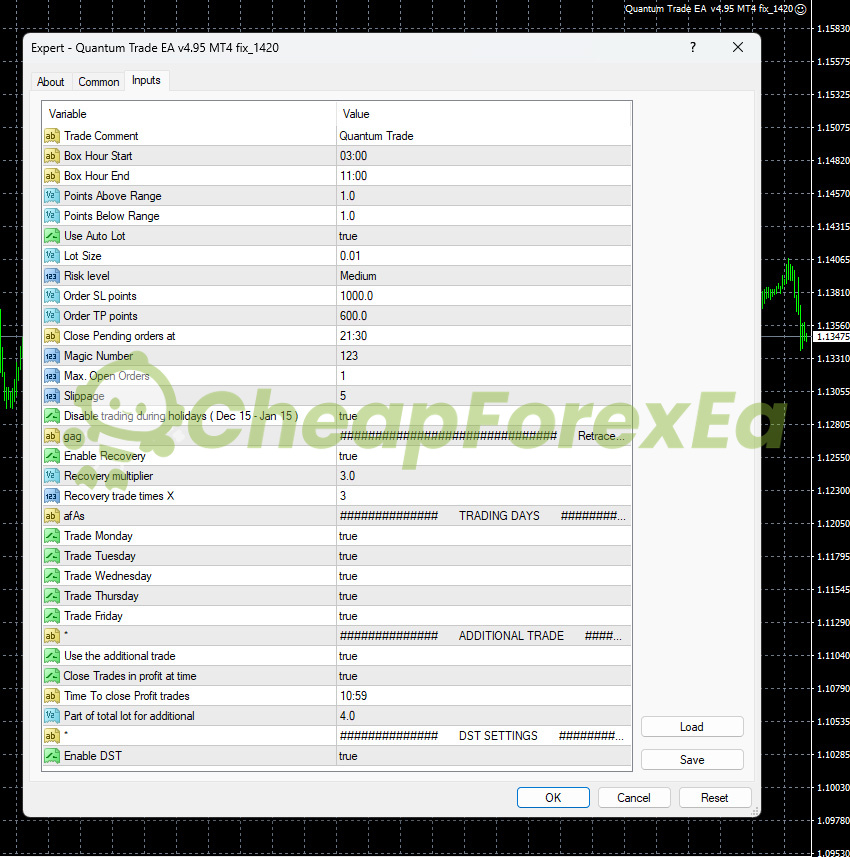
Strategy: GBPUSD H1 session breakout. The EA defines a price box between 03:00 and 11:00 broker server time and places pending orders just above and below that range, targeting the directional breakout following the Asian/London overlap.
Entry: Pending buy stop and sell stop orders placed 1 point above and below the defined range. Max Open Orders is set to 1 in default configuration.
Exit: Primary exit uses a 600-point take profit and 1000-point stop loss with an active trailing stop. All profitable trades close at 10:59 by default. Remaining pending orders close at 21:30.
Risk Control: Auto lot is enabled at Medium risk level by default. Manual lot fallback is 0.01. Recovery mode is enabled with a 3x multiplier across up to 3 recovery trades, increasing position size after a loss. An additional trade feature opens a secondary position at one-quarter of the base lot. Test both behaviors carefully in demo before going live.
✅ Best conditions: Low-spread ECN account (Raw or Razor) • GMT+2 winter / GMT+3 summer broker server time • VPS or 24/7 terminal running continuously
⚠️ Caution: High-spread brokers or requote-prone accounts will degrade breakout entry quality. The recovery multiplier increases risk during consecutive losing sessions — size your base lot conservatively.
Technical Specifications
| Specification | Detail |
|---|---|
| Platform | MT4 (v4.95 confirmed); MT5 referenced in available materials |
| Currency Pair | GBPUSD |
| Timeframe | H1 (required) |
| Minimum Deposit | $200 per available documentation; conservative lot sizing required at this level given recovery mode |
| Leverage | 1:100 used in demo signal; minimum leverage not specified in available materials |
| Broker Type | Low-spread ECN, Raw, or Razor account; IC Markets and Pepperstone referenced |
| Server Time | GMT+2 winter / GMT+3 summer required for default box timing; DST enabled by default |
| VPS | Recommended for stable timed execution |
| Developer | Bogdan Ion Puscasu / Incredible Traders |
Who Should Use This EA
✅ Ideal for:
- GBPUSD traders comfortable with a rule-based session breakout approach with defined entry and exit timing
- Traders running IC Markets or Pepperstone ECN accounts that match the GMT+2/+3 default server time setup
- EA users prepared to demo test recovery mode behavior and the additional trade feature before sizing up on live accounts
✅ Best results when:
- Spread stays consistently low during the 03:00–11:00 box formation window
- Base lot size is kept conservative enough to absorb the 3x recovery multiplier without breaching your personal drawdown tolerance
- Broker server time is confirmed to match GMT+2 winter / GMT+3 summer before the EA runs live
This EA is not suited to traders expecting plug-and-play results without verifying broker server time settings or observing recovery mode behavior in demo first.
Looking for other session breakout or trend-following EAs? Browse our full Forex EA catalog or filter by MT4 EAs and MT5 EAs.
Download Package Included
- ✅ Experts:
- Quantum Trade EA MT4 file (v4.95)
- ✅ Presets:
- GBPUSD H1 settings
Product download link is sent immediately via email after purchase.
Are the Quantum Trade EA results shown here from a real live account?
Is this the Bogdan Ion Puscasu / Incredible Traders Quantum Trade EA, or a different product with the same name?
Does Quantum Trade EA use grid or martingale?
What MQL5 signal records exist and how should I interpret them?
What capital do I need to run this EA?
What are the main risks and how do I manage them?
What broker and account type do I need?
What support do I get after purchase?

You might also like:

CoreX G EA v1.5 MT4 with Setfiles
In stock

Thunderbolt EA v3.5 MT5 with Setfiles
In stock

Regal Spear EA v1.1 MT4 with Setfiles
In stock

FX Intraday Scalper EA v3.0 MT4 with Setfiles (unlimited version)
In stock

Javier Trading Scalper Gold EA MT4 & MT5 with Setfiles (Original working version)
In stock

Instant Funding AI EA MT4 with Setfiles (Original Version)
In stock
Reviews
Clear filtersThere are no reviews yet.