












-
 Original High-Quality Product
 -
One all-inclusive price. No hidden fees
-
Immediate download
-
Free updates for new versions
-
Unlimited Activations
-
24/7 free premium Support
-
7-day money-back guarantee


Mission Profit EA — Automated H1 Trading for EURUSD and GBPUSD on MT4
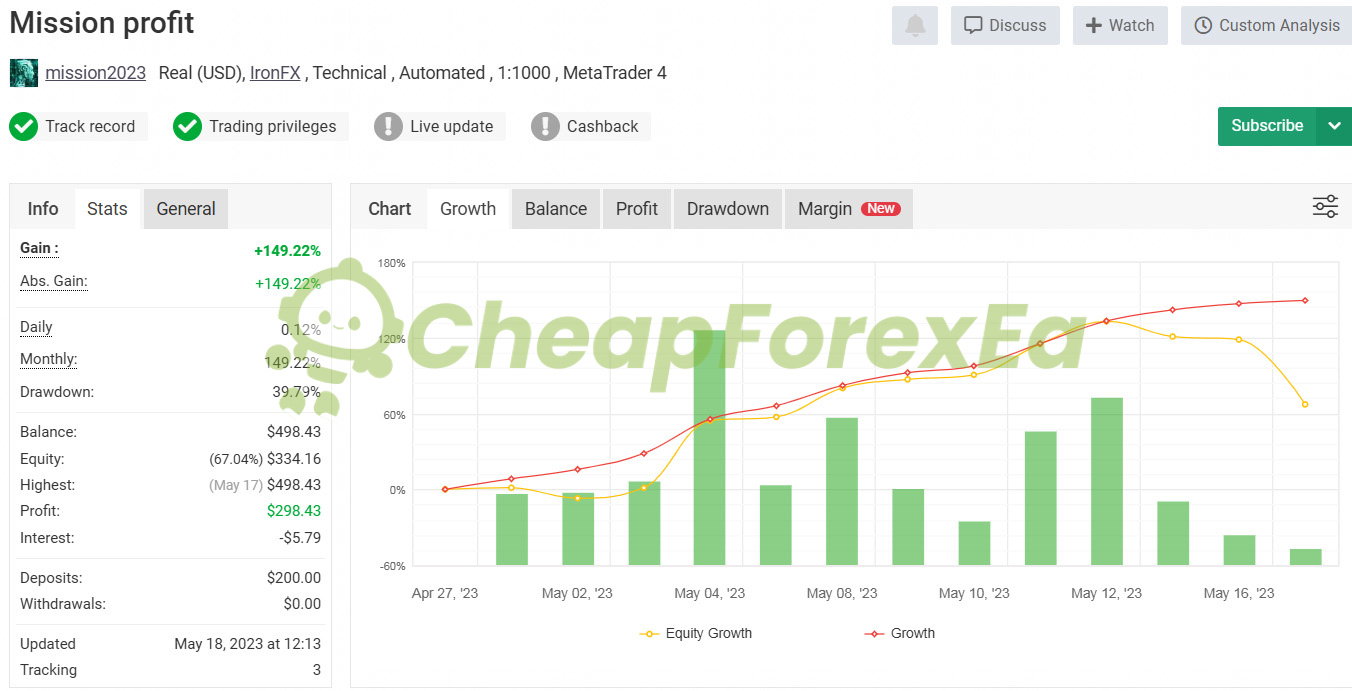
Mission Profit EA is a multi-indicator trend-following system trading EURUSD and GBPUSD on H1 timeframes inside MetaTrader 4. A verified live account on Myfxbook recorded +149.22% gain from a $200 real deposit — though that signal ran only 20 days, which limits what it proves about long-term durability. The 11-year backtest at 99.90% modeling quality provides the stronger structural case for the strategy.
Key Highlights
- ✅ 99.90% modeling quality backtest over 11 years — among the highest fidelity available for MT4 EAs
- ✅ Live Myfxbook real account confirmed +149.22% gain; 39.79% max drawdown requires capital discipline
- ✅ Trades EURUSD and GBPUSD on H1 using five confluent indicators — trend, momentum, volatility, and news filter combined
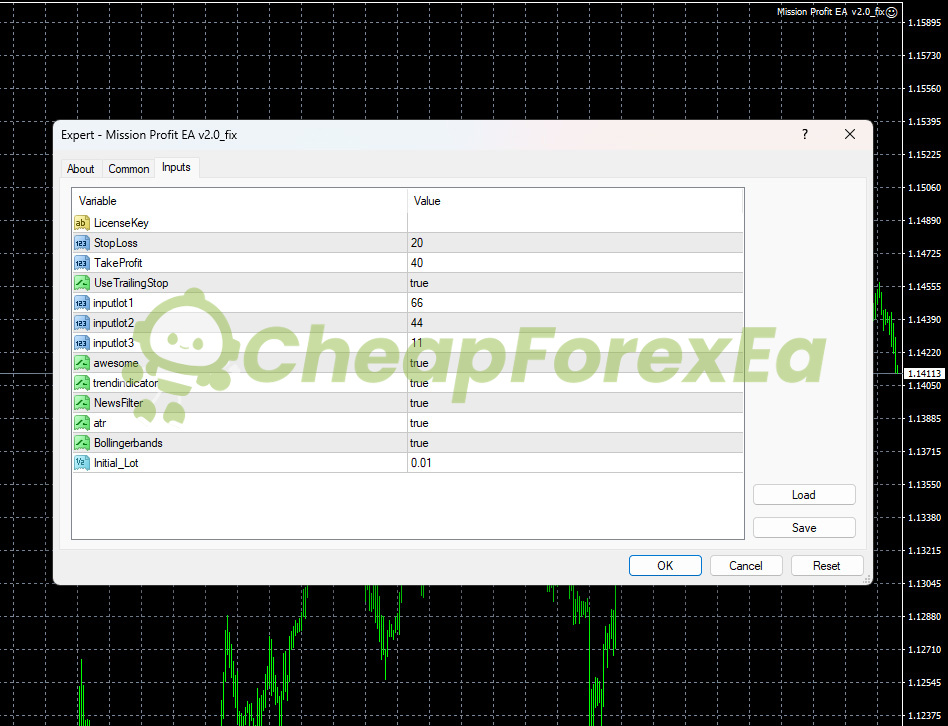
- ✅ Fixed 20-pip stop loss and 40-pip take profit on every trade — no martingale, no grid exposure
- ✅ Built-in news filter blocks trading around high-impact events — a gap most comparable EAs leave open
- ✅ Starts at 0.01 lots with proportional lot scaling — usable from $100, safer from $500+
Performance Results
The Myfxbook live signal (account: mission2023, IronFX, real USD account) recorded +149.22% gain on a $200 deposit between April 27 and May 16, 2023. That 20-day window captured strong directional movement but does not cover ranging markets, major news cycles, or seasonal volatility shifts — conditions a 90-day minimum demo period is specifically designed to stress-test.
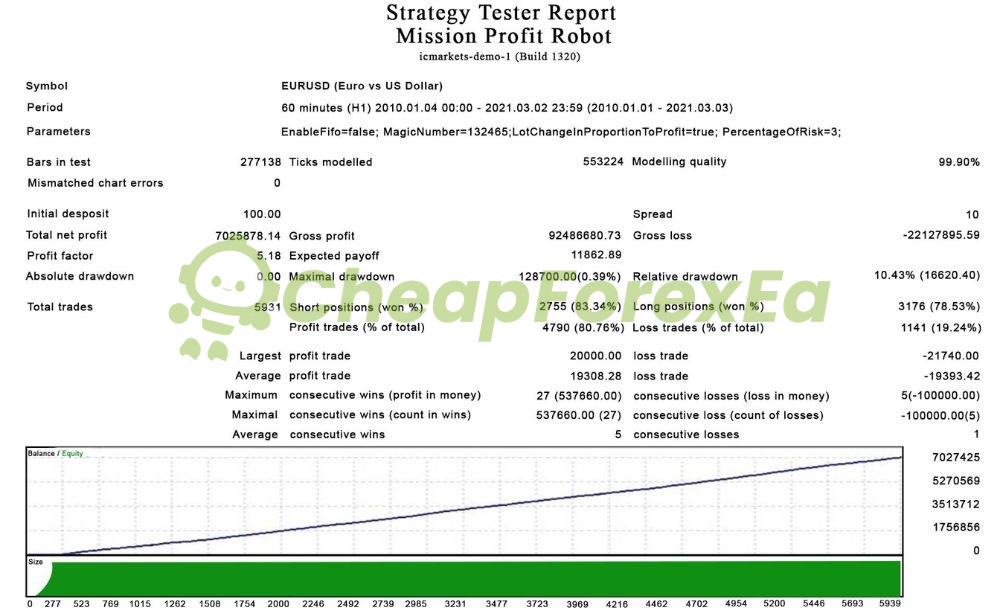
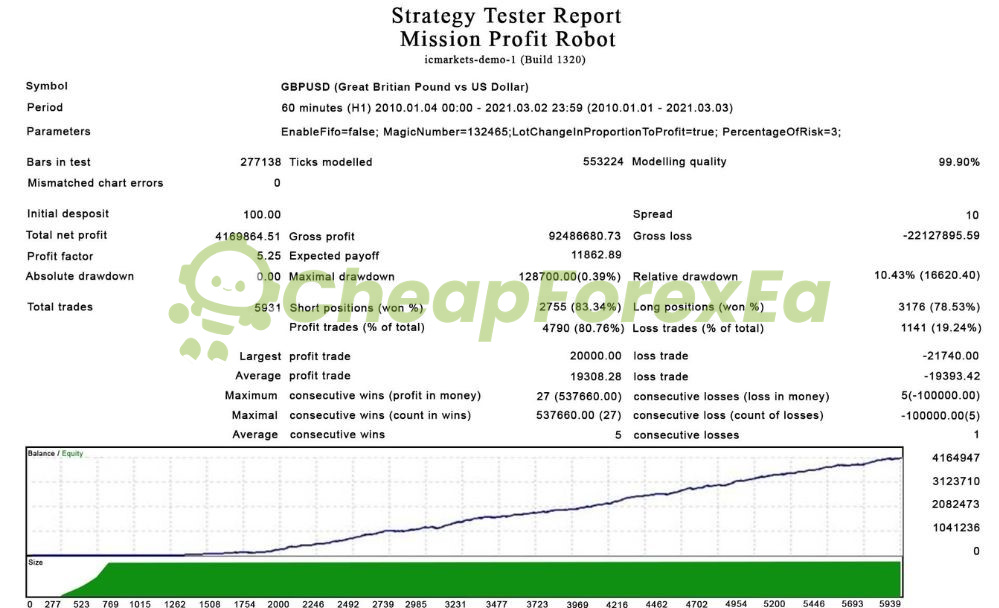
The EURUSD backtest ran from January 2010 to March 2021 — 11 years of H1 data at 99.90% modeling quality. It recorded a profit factor of 5.18, an 80.76% win rate across 5,931 trades, and a maximum relative drawdown of 10.43%. The GBPUSD backtest over the same period produced a profit factor of 5.25 with identical trade statistics, suggesting the strategy parameters generalize across both pairs rather than fitting to one.
The live signal reached 39.79% maximum drawdown — close to the threshold where a single bad sequence threatens account survival. The cause is the 3% risk-per-trade setting combined with proportional lot scaling: as balance grows, position sizes scale up, amplifying loss runs. The live signal recorded a maximum of 5 consecutive losses totalling -$100,000 in backtest dollar terms. Control this by capping PercentageOfRisk at 1–2%, starting on a $500+ balance, and monitoring open equity daily during the first 90-day demo period. At 1% risk, a 5-loss sequence produces roughly half the drawdown — keeping the account in recovery range rather than margin territory.
Live signal tracked April–May 2023 (20 days, real account). Backtest data covers 2010–2021. Market structure has evolved since both data sets — run a 90-day demo to validate under current conditions before deploying live capital. Backtest results differ from live trading due to slippage and spread variation.
How It Works
Strategy: Trend-following on EURUSD and GBPUSD H1 — five indicators confirm directional bias before any entry is placed.
Entry: Awesome Oscillator momentum shift + Trend Indicator confirmation + Bollinger Band position trigger entry.
Exit: Fixed 40-pip take profit as primary exit; ATR-based trailing stop activates to protect open profit.
Risk Control: Fixed 20-pip stop loss per trade; proportional lot sizing tied to PercentageOfRisk (default 3%, recommended 1–2%); news filter blocks entry around high-impact releases — eliminating the slippage spikes that invalidate fixed stops.
✅ Best conditions: Trending H1 market structure • Low spread ECN broker (≤10 pips EURUSD/GBPUSD) • VPS with stable connection for news filter timing
⚠️ Caution: Choppy, range-bound markets where false trend signals accumulate • High-spread brokers that widen during news (filter entry, but spread cost still applies)
Technical Specifications
| Specification | Requirement |
|---|---|
| Platform | MetaTrader 4 (Build 1320+) |
| Currency Pairs | EURUSD, GBPUSD (H1 required) |
| Timeframe | H1 (required — not optional) |
| Minimum Deposit | $100 (high risk at this level — 0.01 lots only) |
| Recommended Deposit | $500–$1,000 (safer drawdown tolerance at 1–2% risk) |
| Leverage | 1:100 minimum (1:500+ tested) |
| Broker Type | ECN/STP preferred; spread ≤10 pips on both pairs |
| VPS | Required — news filter needs stable 24/5 connection; set correct GMT offset for your broker |
This EA runs on MT4 only. Need an MT5-compatible system? Browse MT5 EAs.
Who Should Use This EA
✅ Ideal for:
- Traders with $500–$1,000 available who want a fully automated H1 system without martingale or grid exposure
- MT4 users already running EURUSD or GBPUSD who want a second system to complement manual trading
- Traders comfortable reducing default risk settings — those willing to run 1–2% risk rather than the default 3%
- Buyers prepared to demo test 90+ days before going live — the live signal’s 20-day history requires this validation step
✅ Best results when:
- Running on a VPS with a low-spread ECN broker maintaining ≤10 pips on EURUSD and GBPUSD consistently
- PercentageOfRisk is set to 1–2% — this keeps drawdown within manageable range during losing sequences
Download Package Included
- ✅ Experts:
- Mission Profit EA V2.0(.ex4)
- ✅ Presets:
- FBS – AUDCAD
- FBS – AUDUSD
- FBS – CADJPY
- FBS – EURCHF
- FBS – EURGBP
- FBS – EURJPY
- FBS – EURUSD
- FBS – GBPUSD
- FBS – NZDUSD
- FBS – USDJPY
Product download link sent immediately via email after purchase.
Frequently Asked Questions
What results has Mission Profit EA actually achieved?
Does Mission Profit EA use martingale or grid trading?
How does the built-in news filter work?
Is Mission Profit EA compatible with prop firm challenges?
What is the minimum capital needed to run Mission Profit EA safely?
What are the main risks and how do I manage them?
What broker should I use with Mission Profit EA?
What support do I get after purchase?

You might also like:

Z4scalp EA v2.2 MT4 with Setfiles | Working Version
In stock

IS VIP Third EA MT4 with Setfiles | Original
In stock

CyberVision EA v1.2 MT4 with SetFiles
In stock
Apex EA v2.0 MT4 with Setfiles
In stock
VR Smart Grid EA V18.043 MT4 with setfiles
In stock

Javier Trading Scalper Gold EA MT4 & MT5 with Setfiles (Original working version)
In stock
Reviews
Clear filtersThere are no reviews yet.