













-
 Original High-Quality Product
 -
One all-inclusive price. No hidden fees
-
Immediate download
-
Free updates for new versions
-
Unlimited Activations
-
24/7 free premium Support
-
7-day money-back guarantee


Mad Turtle EA – Automated XAUUSD Trading Robot for MetaTrader 5
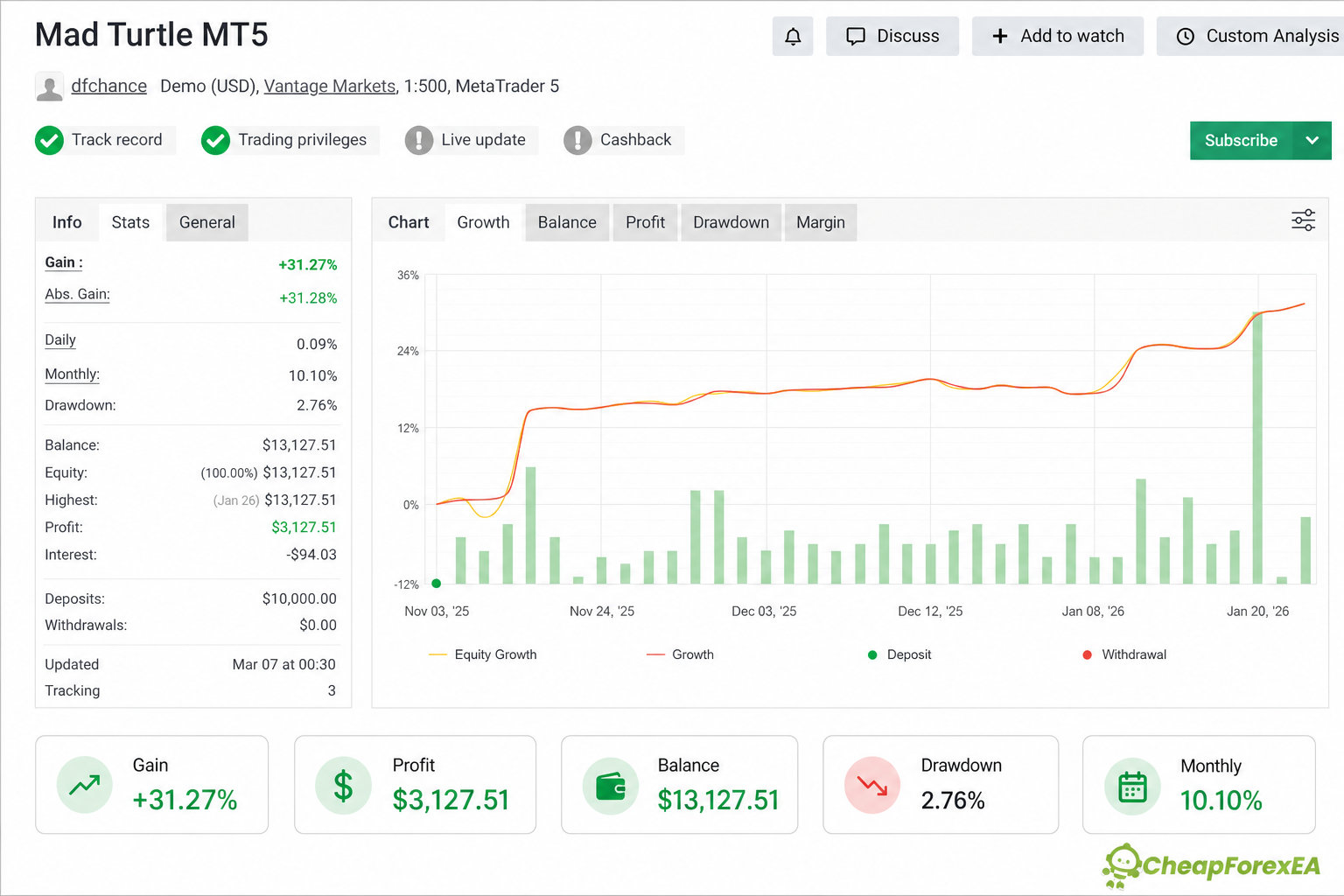
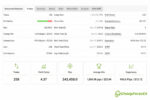
Mad Turtle EA is an automated MetaTrader 5 robot built for XAUUSD (Gold), developed by Gennady Sergienko and sold on the MQL5 Market. This store delivers the v6.50 build together with a full set of fixed-lot and risk-based autolot presets, while the current official MQL5 listing shows a newer v10.1 version built around an expanded machine-learning model set. A public Myfxbook demo account operating under the Mad Turtle name shows a +31.27% gain with 2.76% drawdown over 258 trades, though its link to the developer is unconfirmed.
⚡ Key Highlights
- ⚙️ Multi-model XAUUSD system: the supplied settings select from named strategies (shown as “#2 MadTur M5”); the developer says it avoids traditional grid or martingale recovery.
- 📈 A public Myfxbook demo account named “Mad Turtle MT5” shows a +31.27% gain and 2.76% drawdown over 258 trades, with no confirmed link to the developer.
- 🛡️ The developer describes Stop Loss as integral to the strategy; the supplied configuration uses no trailing stop or quick profit-taking.
- 🔄 Five autolot risk presets (1%-5%) plus fixed-lot and full-auto-low setfiles let you scale exposure without editing EA inputs manually.
- 🖥️ The developer claims broad broker compatibility, including 2- and 3-digit brokers, custom symbol names, and any account currency.
- ⚠️ This package delivers EA version 6.50; the official MQL5 marketplace currently lists a newer v10.1 build with different model architecture.
📊 Performance Results
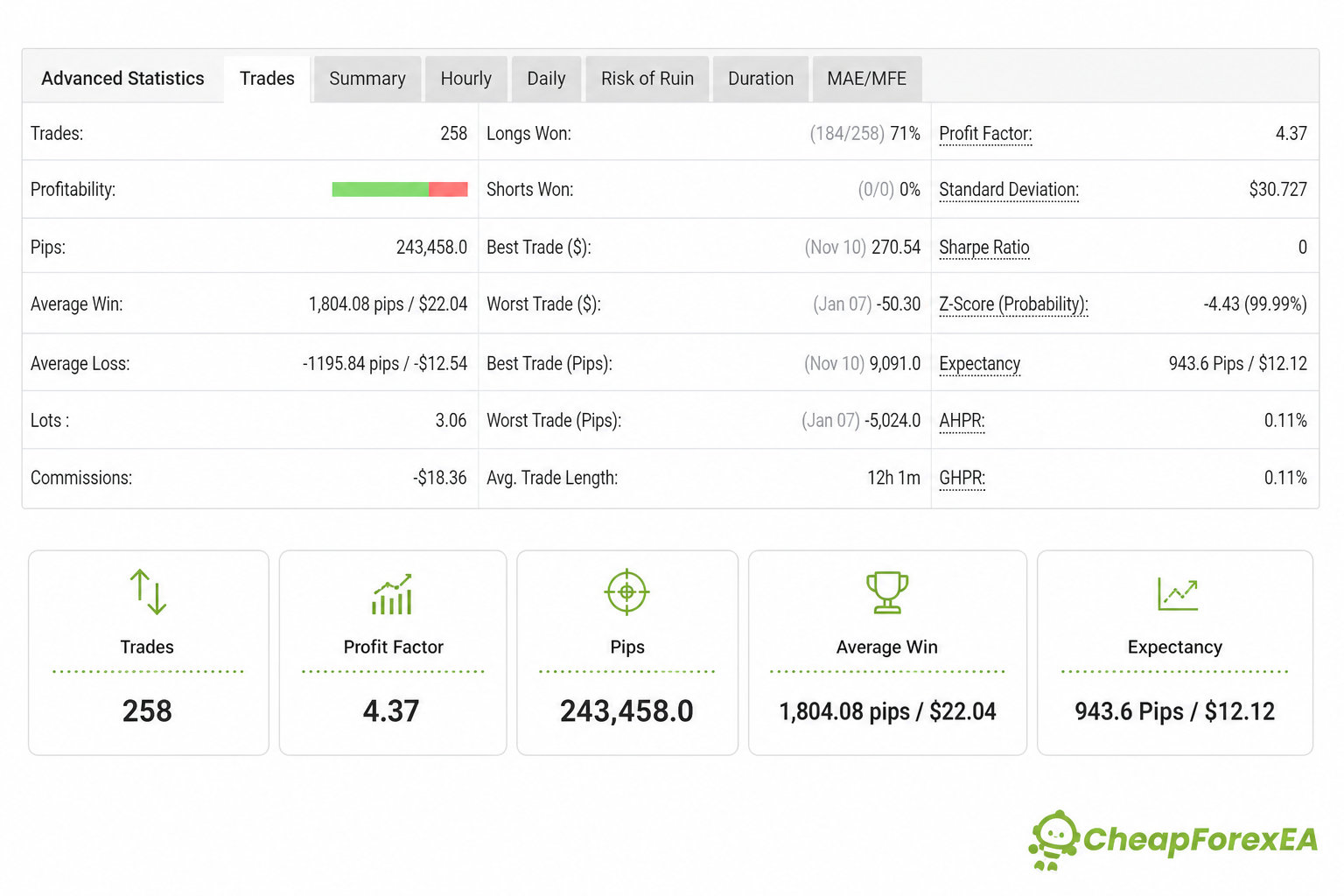
The most concrete available performance record for the Mad Turtle name is a public Myfxbook account, “Mad Turtle MT5,” run by user dfchance on a demo MT5 account at Vantage Markets with 1:500 leverage (Mad Turtle MT5 Myfxbook account). As of its last update, the account shows a +31.27% gain, $3,127.51 profit on a $10,000 starting deposit, 2.76% drawdown, 258 trades, a 4.37 profit factor, and 71% of long trades won, with no short trades recorded. This account is independently operated on demo funds; its connection to the developer is not confirmed, so treat it as third-party evidence rather than an official signal.
The official MQL5 listing (official MQL5 product page) also displays screenshots from two historical signal accounts, citing large cumulative pip totals with balance drawdowns reported under 15%. Both underlying signal pages are no longer accessible, and it is not established whether those figures relate to the v6.50 build in this package or to a later version. Marketplace reviews describe a mix of profitable periods and account-specific losses reported after market conditions changed.
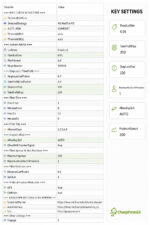
The 2.76% drawdown on the Myfxbook demo account is a favorable figure, but it reflects a demo account over a limited window, not a stress-tested live track record. The supplied settings define risk through Stop Loss distance (100 pips with a 0.7 coefficient) and lot sizing rather than trailing exits, so a losing sequence depends on that Stop Loss level being reached rather than an earlier exit. Because the package includes both a fixed 0.01-lot preset and five autolot risk presets from 1% to 5%, drawdown exposure is meant to scale with whichever preset you select rather than one fixed setting.
These figures come from a third-party public account and historical marketplace screenshots rather than a confirmed official live signal, so past performance does not guarantee future results.
⚙️ How It Works
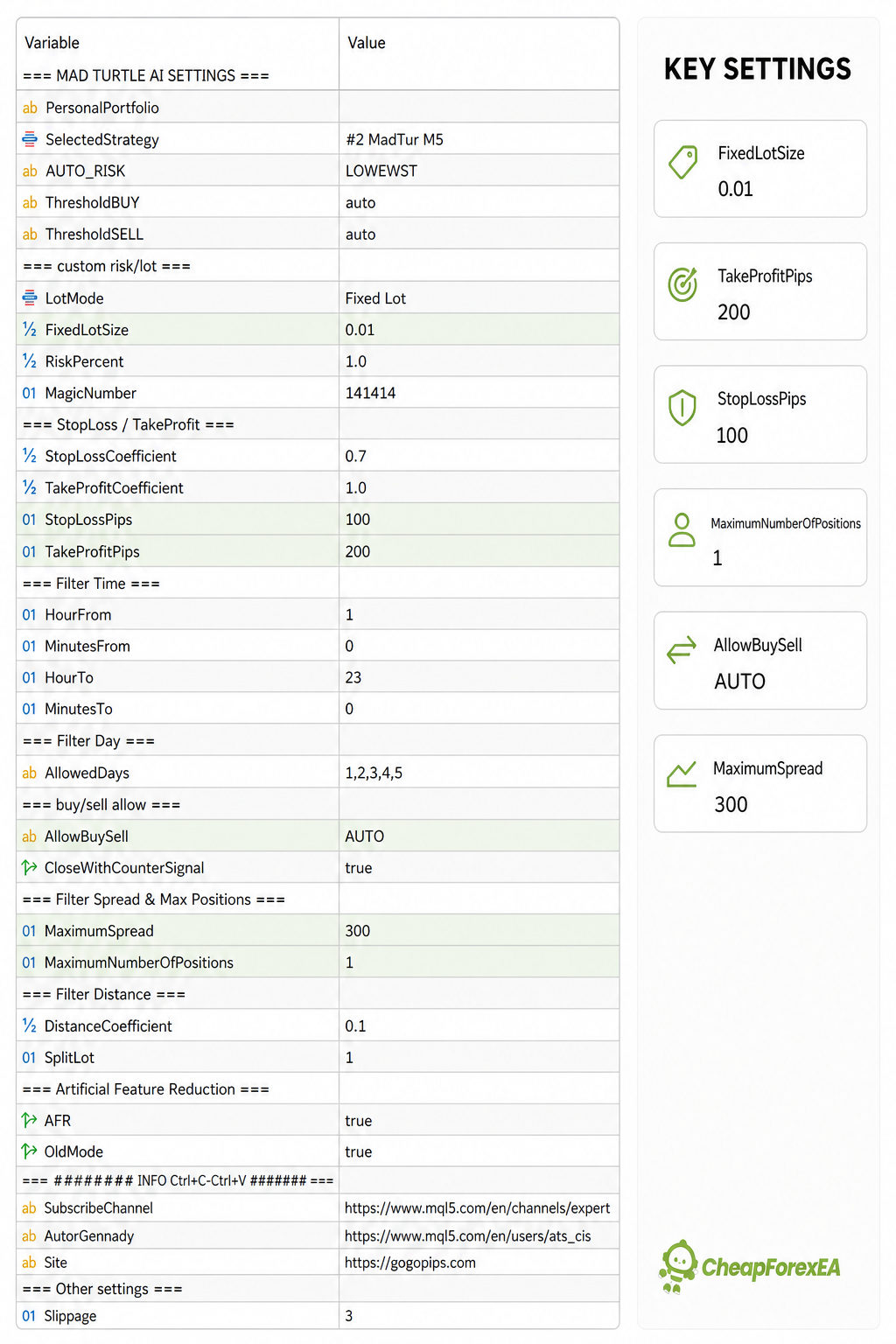
Strategy: Mad Turtle EA trades XAUUSD using an internally selected trading model. The supplied settings panel shows the input SelectedStrategy set to “#2 MadTur M5,” one of several named models the developer has documented across product updates. The developer states the EA avoids traditional grid or martingale recovery.
Entry: Trade direction is generated by the EA’s internal model logic rather than disclosed indicator rules. In the supplied configuration, AllowBuySell is set to AUTO and CloseWithCounterSignal is enabled, so an open trade can close when the model produces an opposite signal.
Position / Grid Management: The supplied settings limit the EA to one open position at a time (MaximumNumberOfPositions = 1) and block new entries once spread exceeds 300 points. Other model variants documented for this product line have used multiple simultaneous positions or averaging, so behavior can differ by model and preset.
Exit: Exits are controlled by a Stop Loss and Take Profit calculated from coefficients (0.7 and 1.0) applied to base pip values (100 / 200 pips) in the supplied preset, plus the counter-signal close described above. The developer states there is no trailing stop or quick profit-taking; Stop Loss is treated as part of the strategy rather than a rare safety net.
Risk Control: Position sizing is set through a lot-mode input, fixed lot or percentage risk, and the package’s five autolot presets (1%-5%) apply this at different risk levels. A trading-hours filter (01:00-23:00) and a Monday-to-Friday day filter are also enabled in the supplied settings.
Caution: Two additional flags, AFR (Artificial Feature Reduction) and OldMode, are enabled in the supplied configuration. Their exact internal effect is not documented in public developer materials, so treat them as inherited defaults rather than settings to change without guidance.
🧩 Technical Specifications
| Specification | Detail |
|---|---|
| Platform | MetaTrader 5 |
| Included Version | v6.50 (current official marketplace lists a newer v10.1 build) |
| Currency Pair | XAUUSD (Gold) |
| Timeframe | Set via internal strategy selection; M5 shown in supplied settings panel |
| Strategy Type | Multi-model automated system, single open position in supplied configuration |
| Minimum Deposit | Not specified for this version (official current listing states $500) |
| Leverage | 1:30 or higher recommended (reseller guidance, not confirmed as official) |
| Broker / Spread Requirement | Broad broker compatibility per developer; supplied settings block trades above 300-point spread |
| VPS | Recommended for continuous operation; not confirmed as mandatory |
🎯 Who Should Use This EA
Ideal for:
- Gold traders comfortable running an automated, model-driven strategy with a single open position at a time.
- Traders who want configurable risk through the included fixed-lot and 1%-5% autolot presets rather than one fixed setting.
- Traders who accept Stop-Loss-based risk definition rather than trailing-stop or quick profit-taking exits.
Best results when:
- Running on a broker with spreads that stay near or below the EA’s own 300-point maximum spread filter.
- Using a VPS so the EA can trade without interruption during its active hours.
Not ideal for: traders expecting the newer ONNX-based multi-model architecture marketed on the current v10.1 marketplace listing, since this package delivers the earlier v6.50 build; or traders wanting a hands-off system without monitoring, since marketplace reviews report drawdowns and inactive periods after market conditions changed.
📦 Download Package Included
- Mad Turtle EA v6.50.ex5
- FULL_AUTO_LOW.set
- Mad Turtle_gold_fixed lot_low.set
- Mad Turtle_gold_autolot_risk1%.set
- Mad Turtle_gold_autolot_risk2%.set
- Mad Turtle_gold_autolot_risk3%.set
- Mad Turtle_gold_autolot_risk4%.set
- Mad Turtle_gold_autolot_risk5%.set
Your download link will be sent to your email address automatically after purchase is confirmed.
❓ Frequently Asked Questions
What performance evidence exists for Mad Turtle EA?
Does Mad Turtle EA use grid or martingale recovery?
Which version of Mad Turtle EA does this package include?
How do I choose which setfile to use?
How much capital do I need to run Mad Turtle EA?
What are the main risks and how are they managed?
What broker conditions does Mad Turtle EA need?
What support do I get after purchase?

You might also like:

Jog Trader EA V12 MT4 + Setfiles | Original & Unlimited
In stock

Correlation EA AI 2024 MT4 with Setfiles | Unlimited – Original
In stock

Fast Gold Scalper EA MT4 | Maximum Profit – Unlimited
In stock

Z4scalp EA v2.2 MT4 with Setfiles | Working Version
In stock

Gold Trading AI EA v1.4 MT4 with Setfiles
In stock

Black Wolf EA MT4 & MT5 (original ultra profit)
In stock
Reviews
Clear filtersThere are no reviews yet.